Engineering · February 12, 2026 · 6 min read · Sartaj Aziz Lone
Views Sync: How We Built a Browser Tool for Watching Multiple YouTube Videos in Sync
See how Appo Matrix built Views Sync, a browser-based tool that lets creators and editors watch and sync multiple YouTube videos in one workspace.
Every so often, a simple frustration points to a genuinely useful product.
Imagine you're a video editor comparing two cuts of the same scene. Or a reaction creator lining up a clip against the original. Or an analyst checking how three videos handle the same moment. You open a few browser tabs, hit play on each, try to start them at the same second, and quickly lose track of which one is ahead.
It works, but it's clumsy.
That everyday annoyance is what led to Views Sync, a web-based tool we built at Appo Matrix that lets people watch and synchronize multiple YouTube videos in a single workspace. In this post, we'll walk through the problem, how we approached it and what it shows about custom web development done well.
What Is Views Sync?
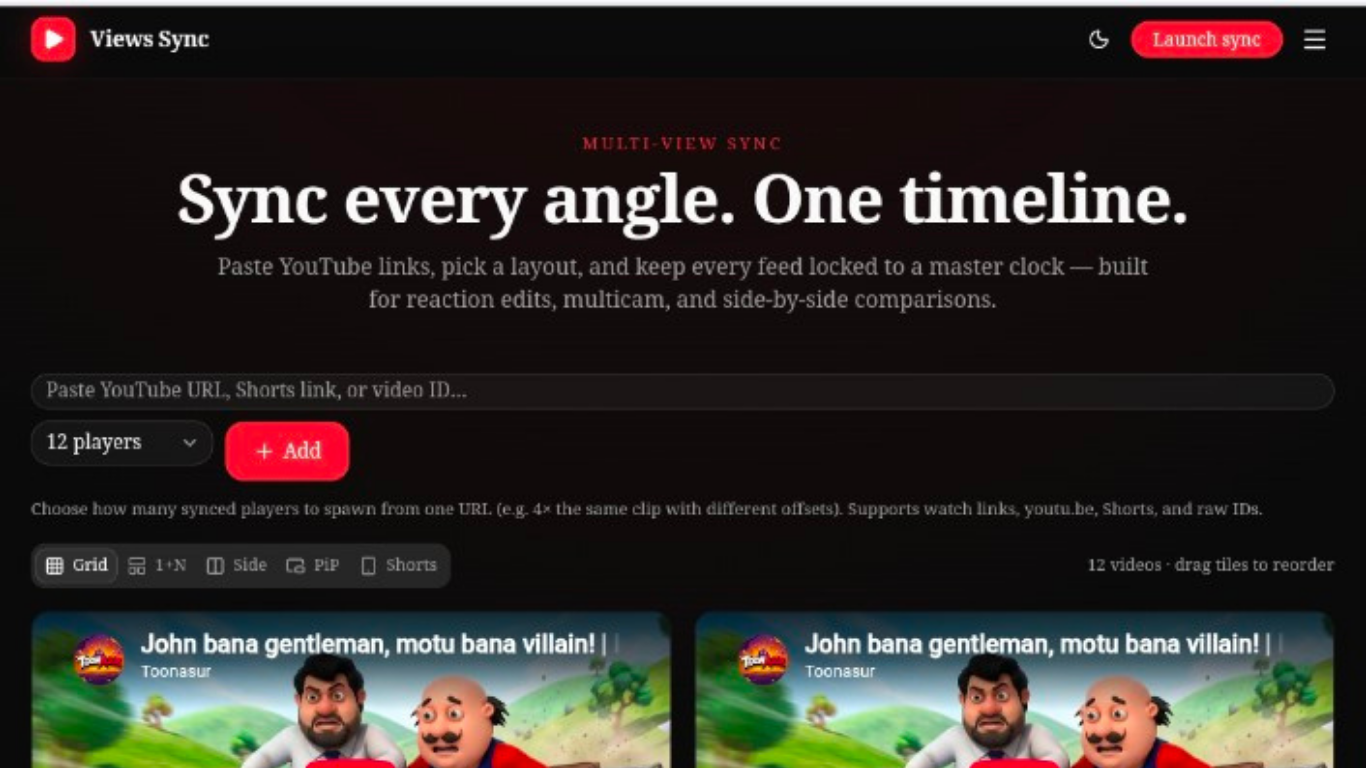
Views Sync is a browser-based workspace where you can bring several YouTube videos together on one screen and control them from a shared timeline. There's nothing to install. You open it in your browser and start watching.
It's designed for people who work with video every day:
Creators and reaction channels who need to watch and compare clips side by side.
Video editors who want to review different cuts or moments together.
Analysts and reviewers who need to study several videos at once.
You can try it yourself at viewssync.com.
The Problem: Too Many Tabs, Too Little Control
Watching one video is easy. Watching several at the same time, and keeping them in step, is not.
When each video lives in its own tab, every player works on its own. That leads to a few familiar headaches:
Constant switching between browser tabs.
Manually adjusting playback so videos line up.
Trouble keeping track of which clip is which.
No simple way to review specific moments side by side.
For creators and editors, this wastes time on every project. The challenge we set ourselves was straightforward: make multi-video viewing easy by putting everything into one accessible workspace.
Our Approach: One Workspace, One Timeline
We started from a simple principle. If the problem is that every video acts alone, the solution is to give them a shared place to live and a single way to control them.
Here's how Views Sync works.
Add videos in seconds
Users can paste in YouTube links or video IDs to bring videos into the workspace. No uploads, no conversion and no complicated setup.
Choose a layout that fits the task
Different jobs need different arrangements. Comparing two clips is not the same as watching four at once. Views Sync offers flexible, supported layouts, and users can reorder video tiles to suit what they're doing.
Stay in sync with a master timeline
A shared master timeline coordinates playback across the videos. Instead of starting and pausing each player separately, you control them together.
Compare specific moments
Views Sync also supports multiple instances of the same video with different offsets. That's useful when you want to look at several moments from one video side by side, or review how a scene plays out from different points in time.
The Results
Views Sync turned a scattered, manual process into one smooth workflow. Here's what it delivers:
Feature
What it means for users
Multiple views
Watch several videos in a single workspace.
Synchronized playback
Coordinate videos through a shared timeline.
Flexible layouts
Arrange players to suit different tasks.
Simplified comparison
Review clips side by side.
Creator-focused design
Support reaction videos, editing and video analysis.
The project's headline numbers tell the same story: fully browser-based access, a multi-view workflow that's up to 10× more convenient, and around 50% less manual video switching.
The Technology Behind It
A good tool needs a solid foundation. For projects like this, our team works with a modern web stack that includes:
Next.js and React for fast, responsive interfaces.
JavaScript and Node.js for flexible front-end and back-end logic.
PHP where it fits the project.
MySQL and PostgreSQL for reliable data storage.
We choose tools based on what the product needs, not on what's fashionable. The right stack is the one that makes your product fast, maintainable and ready to grow.
What This Project Shows About Custom Web Development
Views Sync is a small example of a bigger idea. Here are a few lessons that apply to almost any web project.
1. Start with a real frustration. The best tools solve a problem people already feel. Views Sync began with a very ordinary annoyance, and that clarity kept the product focused.
2. Accessibility wins. Because Views Sync runs entirely in the browser, anyone can use it on their own device without installing anything. Lower friction means more people actually try it.
3. Design around the workflow. Layout options, reorderable tiles and a shared timeline all exist because of how creators and editors really work. Good web development follows the user's workflow rather than forcing them to adapt.
4. Keep it simple. A tool that does a few things really well beats one that does everything badly. Every feature should earn its place.
5. Build for what comes next. A clean architecture makes it easier to add new features, layouts and integrations as users' needs change.
Is Custom Web Development Right for You?
Off-the-shelf software is great when it fits. But sometimes your idea, your workflow or your customers need something that doesn't exist yet. That's when custom web development makes sense.
It's worth considering if:
You have a product idea that no existing tool covers.
Your team is working around the limits of the software you use today.
You want a platform that matches your brand, your process and your growth plans.
You need something that can scale as your business does.
If any of those sound familiar, a conversation is a good first step.
Work With Appo Matrix
Appo Matrix builds digital products, web platforms, mobile apps and SaaS solutions from Gilgit-Baltistan for businesses around the world. We take ideas from the first sketch to a working product, with clear communication along the way.
Have a web tool, platform or product in mind? We'd love to hear about it.
Get in touch with the Appo Matrix team to talk about your project, or explore more of our work in the portfolio.
Frequently Asked Questions
What is Views Sync?
Views Sync is a web-based tool that lets you watch and synchronize multiple YouTube videos in one workspace, with flexible layouts and a shared master timeline.
Who is Views Sync for?
It's built for creators, video editors, reaction channels and anyone who needs to compare or review several videos at once.
Do I need to install anything to use it?
No. Views Sync runs in your browser, so you can open it and get started right away.
Can I add videos with a link?
Yes. You can add YouTube links or video IDs to bring videos into the workspace.
Can I watch different moments from the same video?
Yes. Views Sync supports multiple instances of the same video with different offsets, which makes it handy for comparing specific moments.
Can Appo Matrix build a custom web application for my business?
Yes. We design and develop custom web platforms, SaaS products and web tools tailored to your goals. Reach out through our contact page to start the conversation.
Appo Matrix | Software Solutions & Digital Product Development
Building digital products, web platforms, mobile applications and SaaS solutions from Gilgit-Baltistan for businesses worldwide.